Melody Creator vs AI Melody Generator
Compare Melody Creator and AI melody generators by use case, editability, MIDI/WAV export, learning value, and production workflow.
Key takeaways
- Melody Creator is best when the job is to shape a short melody idea you can see, hear, edit, share, and export as MIDI or WAV.
- AI melody generators are not one category. Some create full songs from prompts, some create background music, and some generate editable MIDI.
- If the next step is a DAW session, note-level editability matters more than whether the first draft sounds polished.
- For songwriting and music education, a visible grid teaches rhythm, contour, scale, and chord fit better than a black-box prompt result.
- For video, podcast, game, or social content that needs finished background audio quickly, an AI music generator can be the faster tool.
Start with the job, not the label
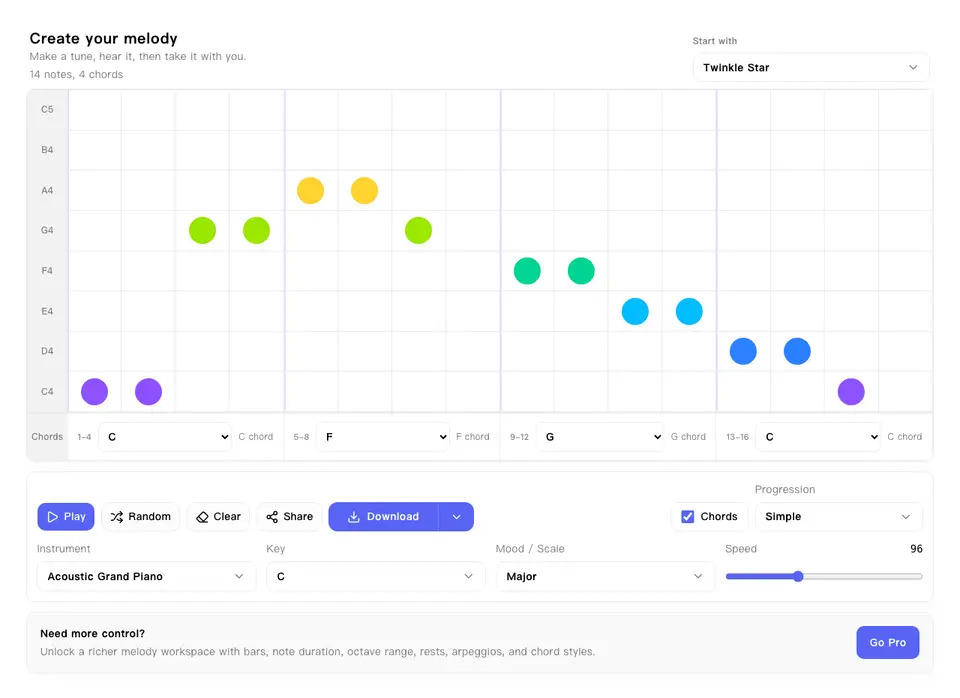
The phrase AI melody generator hides several different products. Suno-style tools focus on complete songs and vocals. Soundraw and Mubert-style tools focus on royalty-free background tracks and beats. MIDI-first tools focus on editable musical data. Melody Creator sits in a different lane: it is a hands-on melody maker for writing a short, inspectable musical idea.
That distinction changes the buying decision. If you need a finished soundtrack for a video, a prompt-to-audio generator may save time. If you need a hook you can edit note by note, transpose, teach, or move into a DAW, the more useful question is whether the tool exposes the melody as musical structure.
What AI melody generators actually offer
The strongest AI tools are very good at turning vague direction into listenable audio. Suno describes a workflow where a prompt, lyrics, or a feeling can become a complete song, with additional controls for style, vocals, editing, remixing, stems, and commercial rights on paid plans. That is valuable when the output itself is the deliverable.
Other AI music tools solve adjacent problems. Soundraw emphasizes browser editing, bar-level adjustments, genre blending, WAV and stem exports on higher plans, and licensing clarity for creators. Mubert focuses on royalty-free soundtracks matched to mood, length, and content use. Lacuna and AudioCipher point toward a more producer-oriented lane: generating or managing MIDI ideas that can continue inside a DAW.
- Prompt-to-song tools are useful when you need a full demo, vocal reference, or social-ready song draft.
- Background music generators are useful when the music supports a video, podcast, app, ad, or game scene.
- AI MIDI tools are useful when you want generated ideas but still need notes, timing, and chords to stay editable.
- Stem and WAV export help arrangement and mixing, but they are still less precise than changing the melody note by note.
Where Melody Creator is stronger
Melody Creator is stronger when the melody itself is the work surface. The 16-step grid makes rhythm and contour visible. You can change the key, scale, tempo, chord progression, and instrument sound, then export the same idea as MIDI for editing or WAV for quick playback.
That makes it a better fit for short hooks, classroom examples, DAW starter ideas, and melody-writing practice. The tool does not pretend to create a finished song with lyrics, vocals, mixing, mastering, and distribution assets. It gives you a small musical object you can understand and keep shaping.
- Use it to test whether a four-note hook still works in minor, pentatonic, or blues scale.
- Use it to hear how the same melody feels over pop, soft, sad, simple, or custom chord movement.
- Use MIDI export when the idea needs to become a piano roll, synth line, lead vocal guide, or notation draft.
- Use WAV export when you need to send a quick audible reference without asking someone to open a MIDI file.
The real trade-off: finished audio vs editable musical intent
A polished AI audio result can be impressive but awkward to revise. If the generated hook is close but the third note clashes with your chord, you need note-level access. Stems can help with mixing, but stems do not automatically make the melody editable as composition data.
Editable MIDI has the opposite trade-off. It may sound plain at first, but it preserves the decisions that matter in production: pitch, timing, note length, chord placement, and arrangement potential. For producers, that can be more valuable than a finished-sounding first draft.
A practical hybrid workflow
The best workflow is often not either-or. Use AI when you need direction, texture, or a reference target. Use Melody Creator when you need to pin down the motif, clean up the rhythm, or create an exportable sketch.
For example, a songwriter could ask an AI tool for a bright indie-pop direction, then rebuild the best two-bar melodic idea in Melody Creator so the notes can be adjusted and exported. A teacher could do the reverse: build a simple motif in Melody Creator, export it, then ask students to compare how AI tools arrange around similar mood prompts.
- Prompt AI for mood and arrangement direction.
- Extract or recreate the best melodic contour in a visible grid.
- Adjust scale, tempo, and chords until the motif works without the full production around it.
- Export MIDI for the DAW or WAV for a fast shareable reference.
Bottom line
Choose Melody Creator when you care about writing, seeing, teaching, exporting, or refining a melody. Choose an AI melody generator when you care more about speed, finished audio, genre exploration, or background music production.
For serious music work, the deciding factor is not whether a tool uses AI. It is what you can do after the first idea appears. If the idea must become your own, editability wins.
Use case matrix
You have a hook in your head and want to capture it fast.
Choose Melody Creator when you need to place notes, hear the loop, adjust rhythm, then export MIDI or WAV without waiting for a full generated song.
You need background music for a video, podcast, ad, or app.
Choose an AI music generator when the goal is a finished bed of music with mood, duration, genre, licensing, and audio export handled quickly.
You want an editable DAW starter idea.
Choose Melody Creator or AI MIDI tools when MIDI keeps notes, timing, chords, and instrument routing open for later editing in Logic, Ableton, FL Studio, GarageBand, or notation software.
You want a complete song demo with vocals and structure.
Choose an AI song generator when you need lyrics, vocals, sections, arrangement, and a produced audio reference more than note-level control.
You are teaching melody writing or learning theory.
Choose Melody Creator when students can see how scale, contour, repetition, chord fit, and rhythm change the result in real time.
You are producing around a fixed chord progression.
Choose Melody Creator first when you need the melody to fit specific chords before arranging, sound designing, or asking AI for broader production directions.
Try the workflow
Start with a short melody sketch, listen to the loop, then export the idea as MIDI when it is ready for a DAW.
Open Melody CreatorSource notes
This comparison uses current public positioning from AI music and MIDI tool pages, then maps those claims back to practical melody writing workflows.
- Suno: Useful reference for prompt-to-song workflows, style controls, editing, remixing, commercial rights, and stem export positioning.
- Soundraw: Useful reference for AI background music, bar-level editing, genre blending, licensing claims, WAV, and stem export workflows.
- Lacuna: Useful reference for the MIDI-oriented branch of AI music tools, where prompts can lead to editable musical material.
- Mubert: Useful reference for soundtrack-style AI music matched to mood, duration, content use, and API or product integration needs.
- OpenMusic: Useful reference for all-in-one AI music workflows that combine prompt generation, editing tools, audio-to-MIDI, stems, and mastering claims.
- AudioCipher: Useful reference for text-to-MIDI and DAW-oriented melody or chord idea workflows.